
Start in a few minutes
To play Little Tea Shop (Tiệm Trà Nhỏ), start with one trading day: buy ingredients, read each order, make the requested bubble tea, serve customers and use your profit to grow the shop. You can begin in your browser without installing an app.
- Open the game and choose Start playing. Local play needs no account. Choose Continue if you already have progress.
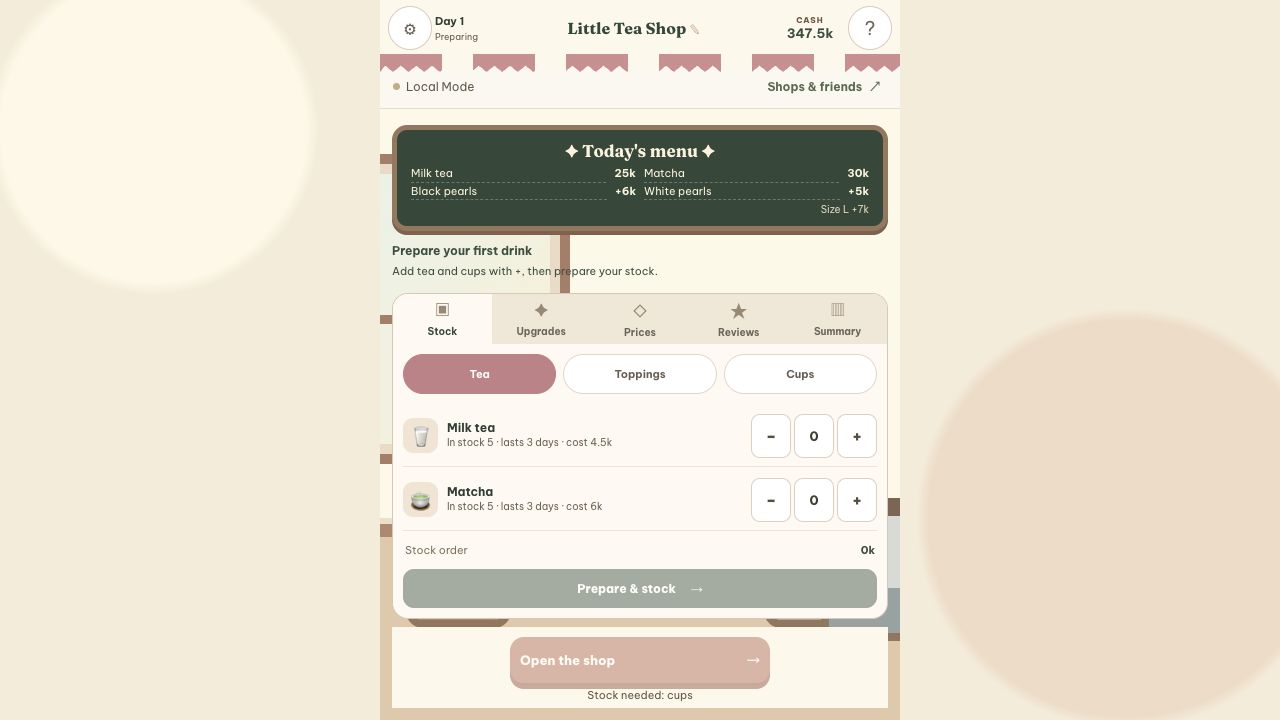
- Prepare tea and cups in Stock. Use + to choose portions, then Prepare stock. Start with a small batch and keep money for tomorrow.
- Open and read your first order. Check the tea, cup size, flavor and topping before making the drink.
- Make, seal and serve. Follow the steps below; How to play in the game walks you through the controls.
A gentle start: learn in your local shop. When you want backups and friend visits, choose Smooth Play and sign in with Google to back up the shop you already play; wait for “Backed up” before switching devices. Ranked play is a separate mode.
Example: prepare your first day with 400k
This is a small practice basket, not a guaranteed profit strategy. Prices below match v2.2.0 and use the game’s k display.
| Item | Quantity | Cost |
|---|---|---|
| Milk tea | 5 × 4.5k | 22.5k |
| Matcha | 5 × 6k | 30k |
| Black pearls | 5 × 2k | 10k |
| White pearls | 5 × 1.5k | 7.5k |
| Cups + straws | 10 × 1.5k | 15k |
- In Stock → Tea, set milk tea and matcha to 5 portions each. Switch to Toppings for the pearls, then Cups for 10 cups.
- Check that the stock order totals 85k, then choose Prepare & stock. Your available stock increases and cash falls to 315k if you have made no other purchases.
- Choose Open the shop. Customers order from available ingredients; you do not need to unlock extra drinks to start.
- After the day, check drinks sold and expired stock before restocking. This basket is for learning the controls and may not cover every customer throughout the day.
Example order: Milk tea · M · Black pearls
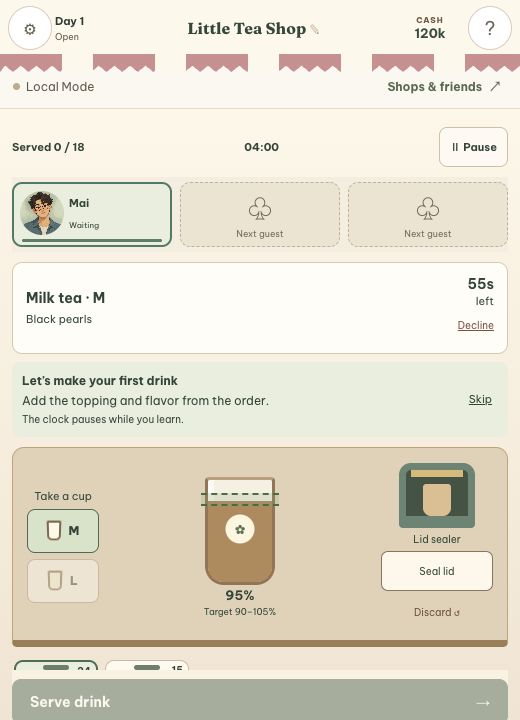
If no flavor is requested, choose an M cup → Milk tea → hold to pour to around 100% → add Black pearls → Seal lid → wait for Sealed → Serve drink. Set sugar and ice only when the order requests them. This is an example: read the selected order instead of making every drink the same.
Over 105%, wrong cup or wrong topping? Discard and start again. The +5% button cannot remove tea, and the cup and ingredients already used are not refunded.
Make drinks & run a full day
Read the order → choose a cup → pour → seal → serve
- Select a waiting customer. Switch between orders when several guests arrive. Each customer keeps a separate drink in progress. Watch their patience to decide whom to serve next.
- Choose the right M or L cup. Pick the requested tea, hold to pour, then release in the 90–105% target range. Use +5% for a fine adjustment.
- Match the flavor and topping. From day 6, also match the sugar and ice levels shown on the order.
- Seal, then serve. If you have an automatic sealer, let it finish. Pour away an incorrect drink and start again; ingredients already used are spent.
Keep the shop running
- Stock: check tea, toppings, cups and expiry dates before opening. Buying too much can mean wasted ingredients.
- Prices & menu: balance selling prices with costs and add new drinks as your capacity grows.
- Upgrades & staff: invest in equipment, counter space and help with preparing and serving orders.
- Day summary: review revenue, costs, ratings and expired stock, then plan the next day.
When should you grow the shop?
Find your way around preparation
- Stock: buy ingredients before opening. Setting quantities only fills the basket; Prepare & stock completes the purchase.
- Upgrades: unlock menu items and buy flavors, equipment or staff. After unlocking a tea or topping, return to Stock to buy its ingredients.
- Prices: set tea prices, extras and the L-size surcharge before opening. Very high prices can lower ratings.
- Reviews / Summary: look for complaints about accuracy, waiting or prices, then compare them with revenue and costs.
Three costs to plan for
Expiry: black pearls last for the current day; starting teas and white pearls last 3 days. Cups do not expire. Stock lists each item’s shelf life, and expired portions are removed at day end.
Wages: hiring has an upfront cost and each active worker earns a daily wage. Wages are charged when you open. If you cannot afford them, go to Upgrades → Staff and take someone off shift before opening again.
Upgrades: equipment contributes to expenses on the day you buy it, so high sales do not always mean a profit. Set aside enough cash for tomorrow’s tea and cups before a large purchase.
What do equipment and staff do?
Your initial counter holds up to 3 customers at once; an expanded counter holds 4. An automatic sealer handles a correctly made drink’s lid. Counter assistants help with pouring, while a barista can handle orders independently after meeting their unlock conditions. Read each worker’s description before hiring.
Use the gear button to pause for a break. Close early ends the day, sends waiting guests away and discards unfinished drinks; choose it when you want to finish the day. When the normal trading timer runs out, no new customers arrive, but you may finish accepted orders while those customers are still waiting.
Check the drink before serving
When learning Little Tea Shop, a consistent order check helps you catch missing details. Read the selected guest’s order, then check these items before pressing Serve drink:
- The M or L cup size matches, and the drink belongs to the selected guest.
- Tea, toppings and flavor match; do not add ingredients the guest did not order.
- The drink is in the 90–105% target zone; use +5% for small adjustments.
- Sugar and ice match when these options appear in the order.
- The lid has finished sealing and the guest is still waiting.
If tea or toppings are wrong, discard the drink and remake it. See what to check if Serve is still disabled. On your phone, swipe across ingredient rows to reach choices outside the screen.