

Open the game and play
Play on your phone or computer without downloading an app. Local Mode needs no account.
The official Little Tea Shop website · tiemtranho.com
Play Little Tea Shop (Tiệm Trà Nhỏ) free in your browser, with no download. Make bubble tea to order and grow your shop on phone or desktop. Local Mode needs no signup.
Latest 2026 version · Phone & desktop
Little Tea Shop (Tiệm Trà Nhỏ) is a free HTML5 bubble tea making and shop management game. Play right in your browser with no app download: stock tea and toppings, make each customer's drink to order, and use your earnings to grow your shop.
Play on your phone or computer without downloading an app. Local Mode needs no account.
Buy a small batch, make drinks, then check your profit and customer reviews before the next day.
Local progress stays in this browser. Back it up before clearing data or switching devices →
The core loop is easy to learn. The in-game guide walks you through each step if you need a reminder.
Open the shopUse Stock to choose portions, prepare them, then open for the day. Watch expiry dates.
Pick an M or L cup, pour the requested tea to the marked level and add the requested flavor or topping.
Set sugar and ice when requested. A correct drink served quickly earns better reviews.
Check the day's revenue, costs and ratings. Unlock more ingredients and shop upgrades as you grow.
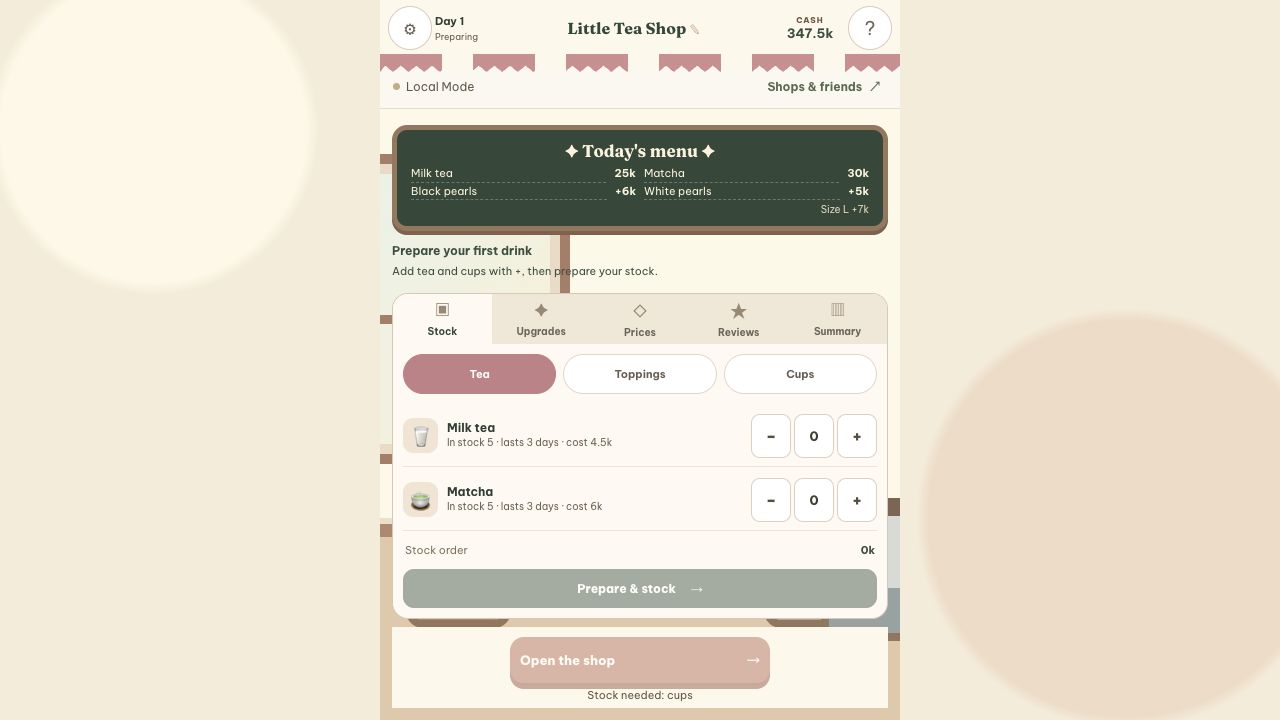
You begin with 400k. Try the 85k practice basket: 5 milk tea, 5 matcha, 5 black pearls, 5 white pearls and 10 cups. Keep the rest for later; this is a practice batch, not a full day’s stock.
See quantities and the first drink →These two game screens show the daily routine: prepare your ingredients, then read each order and make the drink. Your first day includes coaching at the counter, with the clock paused while you learn the controls.

Give Little Tea Shop its own look in Decorate: mix the sign, awning, menu board, counter, wall, lighting and cup pattern. Apply a style or change individual details; each shop keeps its own appearance. Visiting friends see your most recently synced decorations.
See the new shop themes →At the end of a day, create an image of your cups sold, profit and in-game shop rating. Save the image or share it from your phone, with a caption you can edit. No account is needed to create the image.
How to share your daily results →Unlock more recipes and ingredients as you learn the counter. Use your earnings for equipment and staff upgrades, then compare your results at the next daily summary.
How upgrades work →Choose how you want to keep your progress, then make the game easy to reopen on your phone.
Local Mode saves progress here without a login. Clearing site data can remove that save. Export a backup before resetting the shop or changing browsers.
Back up and restore progress →Choose Smooth Play and sign in with Google for cloud backups and friend visits. You can also appoint one friend as deputy manager to help run and decorate the shop. One person operates it at a time, and you can revoke access. Wait for “Backed up” before switching devices.
Compare Local and online play →How friend visits work →Open the game in a browser; an APK or iOS app is not needed. You can add a Home Screen shortcut, but it does not back up your progress.
Add on iPhone / iPad →Add on Android →Check the tea, M or L size, toppings and flavor your guest wants. When sugar or ice appears on the order, choose the requested level before serving. Hold to pour and release in the target zone; use +5% for small adjustments. If the drink is wrong, discard it and try again while watching the guest's remaining patience.
Stock currently shows a three-day shelf life for milk tea and matcha, but only one day for black pearls. Avoid buying lots of short-lived toppings before you know how many drinks you can serve. Review leftover stock and costs at the day summary before ordering another batch. Having spare cash does not mean every ingredient needs restocking.
Practise reading orders and pouring before expanding the menu too quickly. Once you can serve reliably, check Upgrades for ingredients, equipment or staff that fit your needs. Keep enough cash to stock the next day. Compare drinks sold and customer reviews after an upgrade to see whether it actually helps your shop.
On your phone, swipe across the tea, topping and flavor rows to reach choices beyond the screen. Tap a customer's card to switch orders, then check the selected order before serving. Pause when you need to step away from the counter. You can also add a Home Screen shortcut to open the game more quickly next time.
Read the step-by-step stock and drink guide → · Play on your phone → · Other games
Try Little Tea Shop (Tiệm Trà Nhỏ) here: make bubble tea, grow your shop and keep your progress. Play free in your browser, with detailed guides and optional cloud backups.
See how to start playing Little Tea Shop →You can play for free in your browser. Local Mode needs no account. Sign in with Google only when you choose Smooth Play cloud backups or friends features.
No APK or app installation is needed. Open the game in your browser on a phone or computer. You can also add a shortcut using the iPhone / iPad or Android instructions; a shortcut is not a backup.
Local progress saves in this browser. Smooth Play backs up your existing shop to the cloud; another device receives the latest successful backup. Clearing browser data can remove local progress and changes that have not synced. See how to back up before switching devices.
No. Little Tea Shop in English and Tiệm Trà Nhỏ in Vietnamese on tiemtranho.com share progress in the same browser on the same device. A different browser or device needs a transferred backup or your Smooth Play cloud save.
You can reset your Local or Smooth Play shop in Settings. Make a backup before confirming; ranked shops are managed separately. Read the reset and recovery guide.
Buy tea and toppings for the number of drinks you can serve, check expiry dates, and review revenue and costs at the end of each day. Increase stock as your speed and accuracy improve. See the stock and drink preparation guide.
We keep improving Little Tea Shop with player feedback. See what changed, rate your experience, or tell us what you would like next.
From day 2, open the Shop journal in Local / Smooth Play to choose your pace, check the forecast and try a daily offer.
See player feedback and improvements →Discuss ideas on Discord ↗
Make a drink, welcome your first customer and see how far your little shop can go.
Play now